
I had a requirement to delete multiple access points that had been decommissioned from a network, but sitting there manually selecting them and deleting them would be painful.
I decided to utilise the Prime Infrastructure 3.X published REST APIs to see if I could do this. The API Guide is here. (You Might need to sign up for a Cisco Developer Account which is free)
The API that I found that could do it was:
https://PRIME IP/webacs/api/v1/op/apService/deleteAp
Unfortunately currently the REST API only allows you to delete APs utilising their name
Now as I am only going to need to run this as a one off I utilised Chrome’s Postman App.
The API is a PUT command so I select PUT, then add the URL (With Primes IP/DNS) and select Authorization > Basic and enter your Prime User Credentials and press “update request” NOTE: I found using the root account caused less issues if deleting heaps of APs as normal users had API call limits.

Then you select body and select the raw radio button, select XML (application/xml) from the drop down list and enter the following code
Single AP Payload:
<?xml version="1.0" encoding="UTF-8" ?>
<apCandidate>
<apNames>
<apName>AP NAME</apName>
</apNames>
</apCandidate>
Multiple AP Payload:
<?xml version="1.0" encoding="UTF-8" ?>
<apCandidate>
<apNames>
<apName>AP NAME</apName>
<apName>AP NAME</apName>
</apNames>
</apCandidate>
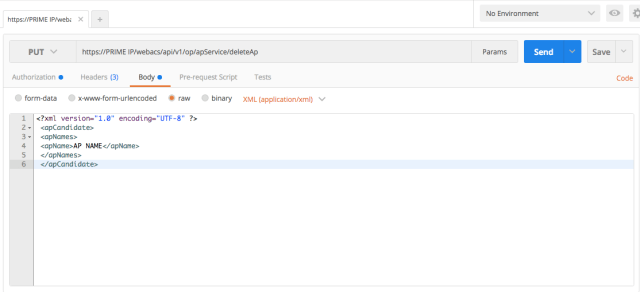
Next you press the send button and all the AP’s are deleted from Prime.
 THE WLAN